Graphify: Turn Your Codebase into a Knowledge Graph
You've just joined a new team. The codebase has hundreds of files spanning Python, TypeScript, Markdown docs, and a few architecture diagrams. You need to understand how the authentication system connects to the database layer, but grep "auth" returns 200 results across 40 files. You try asking your AI coding assistant, but it reads files one by one, burns through tokens, and forgets everything next session.
This is the problem Graphify solves. It turns your entire project — code, docs, PDFs, images, even videos — into a persistent knowledge graph that you can query instead of grepping through files.
One command:
/graphify .
And you get an interactive map of your entire project.
Video Walkthrough#
If you prefer a video walkthrough, this covers the essentials quickly:
What Problem Does Graphify Solve?#
When developers or AI coding assistants need to understand a codebase, they typically grep through files or read source files one by one. These approaches have fundamental limitations:
- No structural awareness — Grep finds string matches but doesn't reveal how concepts relate to each other across files and modules.
- Token cost at scale — Sending raw source files to an AI assistant for every question is expensive. A 52-file corpus can consume 71.5x more tokens per query compared to querying a pre-built graph.
- Cross-file relationships are invisible — An import in one file, a function call in another, and a design rationale in a doc are logically connected, but flat file reads don't surface these connections.
- No persistence — Without a persistent representation, every new conversation with an AI assistant starts from scratch.
Graphify addresses all four by extracting entities (functions, classes, concepts, design decisions) and their relationships (calls, imports, implements, semantically similar to) into a graph you can query cheaply and persistently.
Key Concepts#
Before diving into usage, here are the core abstractions Graphify works with:
Nodes represent entities extracted from your project:
- Code entities — classes, functions, methods, modules (extracted via tree-sitter AST parsing, no LLM needed)
- Document concepts — topics, design decisions, architectural patterns (extracted via LLM semantic analysis)
- Rationale nodes — inline comments (
# NOTE:,# WHY:,# HACK:), docstrings, and design rationale linked to the code they explain
Edges connect nodes with typed relationships like calls, imports, implements, references, and semantically_similar_to.
Confidence tags label every relationship:
| Tag | Meaning |
|---|---|
EXTRACTED | Found directly in source (e.g., an import statement, a function call). Confidence 1.0. |
INFERRED | A reasonable deduction (e.g., cross-file call-graph resolution, co-occurrence). Scored 0.55–0.95. |
AMBIGUOUS | Uncertain — flagged in the report for human review. |
Communities are groups of densely-connected nodes discovered by community detection algorithms. They surface natural module boundaries — even across different file types.
God nodes are the most-connected nodes in the graph: the concepts everything flows through, forming the architectural spine of your project.
Surprising connections are cross-community edges ranked by how unexpected they are — they reveal non-obvious relationships between concepts in different parts of the codebase.
When to Use Graphify#
Not every situation calls for a knowledge graph. Here's a quick guide:
| Scenario | Best Tool |
|---|---|
| Quick keyword lookup in a known file | grep / IDE search |
| Understanding one function's implementation | Read the file directly |
| Tracing how module A connects to module C through B | graphify path "A" "C" |
| Understanding an unfamiliar codebase's architecture | graphify . then explore the report |
| Repeated AI-assistant queries about a large project | Build graph once, query cheaply forever |
| Finding non-obvious cross-file dependencies | Graph's surprising connections + community bridges |
| One-off question about a small (fewer than 20 file) project | Just read the files directly |
The sweet spot: you have a codebase that's too large to hold in a single context window, you need to trace relationships across files, or you want your AI assistant to have persistent structural memory of your project.
Pros and Cons#
Advantages#
| Advantage | Detail |
|---|---|
| Saves tokens | Querying the graph is ~71x cheaper than sending raw files to an AI assistant every time. |
| Sees connections across files | One query can trace a chain from module A through B to C, even across different languages or file types. |
| Works with everything | Code, docs, PDFs, images, and videos all live in the same graph. |
| Remembers between sessions | The graph persists in graphify-out/, so your AI assistant doesn't start over each conversation. |
| Only rebuilds what changed | The --update flag skips unchanged files. Re-runs are fast. |
| Code analysis is free | Parsing code uses tree-sitter locally. No API key, no internet, no cost. |
| Works everywhere | Supports Claude Code, Codex, Cursor, Gemini CLI, Copilot, Aider, and many more. |
Limitations#
| Limitation | Detail |
|---|---|
| Non-code files cost tokens | Docs, PDFs, and images need LLM calls to extract meaning. Code-only projects avoid this. |
| First build is slow | Expect 1–3 minutes on a 150-file project. After that, incremental updates are fast. |
| Not perfect for huge repos | Projects with 500+ files work best when you scope to subfolders or use --update. |
| Static only | Graphify reads your source code as written. It can't see things that only happen at runtime (like dynamic imports or reflection). |
| Requires Python 3.10+ | Uses modern Python features not available in older versions. |
Installation#
Prerequisites#
- Python 3.10+
uv(recommended) orpipx/pip
Install the Package#
# Recommended — uv puts graphify on PATH automatically:
uv tool install graphifyy

# Alternatives:
pipx install graphifyy
pip install graphifyy
Note: The PyPI package is
graphifyy(double-y). The CLI command isgraphify.
Optional Extras#
Install only what you need:
uv tool install "graphifyy[pdf]"       # PDF extraction
uv tool install "graphifyy[office]"    # .docx and .xlsx
uv tool install "graphifyy[video]"     # Video/audio transcription
uv tool install "graphifyy[mcp]"       # MCP stdio server
uv tool install "graphifyy[ollama]"    # Ollama local inference
uv tool install "graphifyy[all]"       # Everything
Register with Your AI Assistant#
graphify install
This writes a skill file so your AI assistant recognizes /graphify as a command. Supported platforms include Claude Code, Codex, OpenCode, Kilo Code, Cursor, Gemini CLI, GitHub Copilot CLI, VS Code Copilot Chat, Aider, Amp, and many more.
To install into the current repository instead of your user profile:
graphify install --project
Here's what the installation looks like in a terminal:
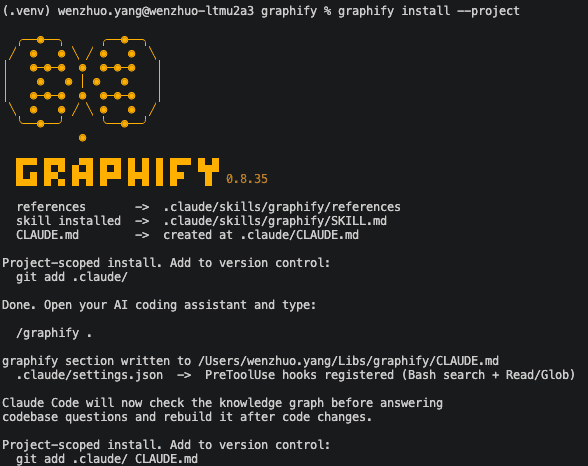
After installation, Claude Code will automatically check the knowledge graph before answering codebase questions and rebuild it after code changes.
Usage#
Building a Graph#
Inside your AI assistant, from your project root:
/graphify .
This runs the full pipeline: detects files by type, extracts entities and relationships, builds the graph, runs community detection, and generates three output files in graphify-out/:
| File | Purpose |
|---|---|
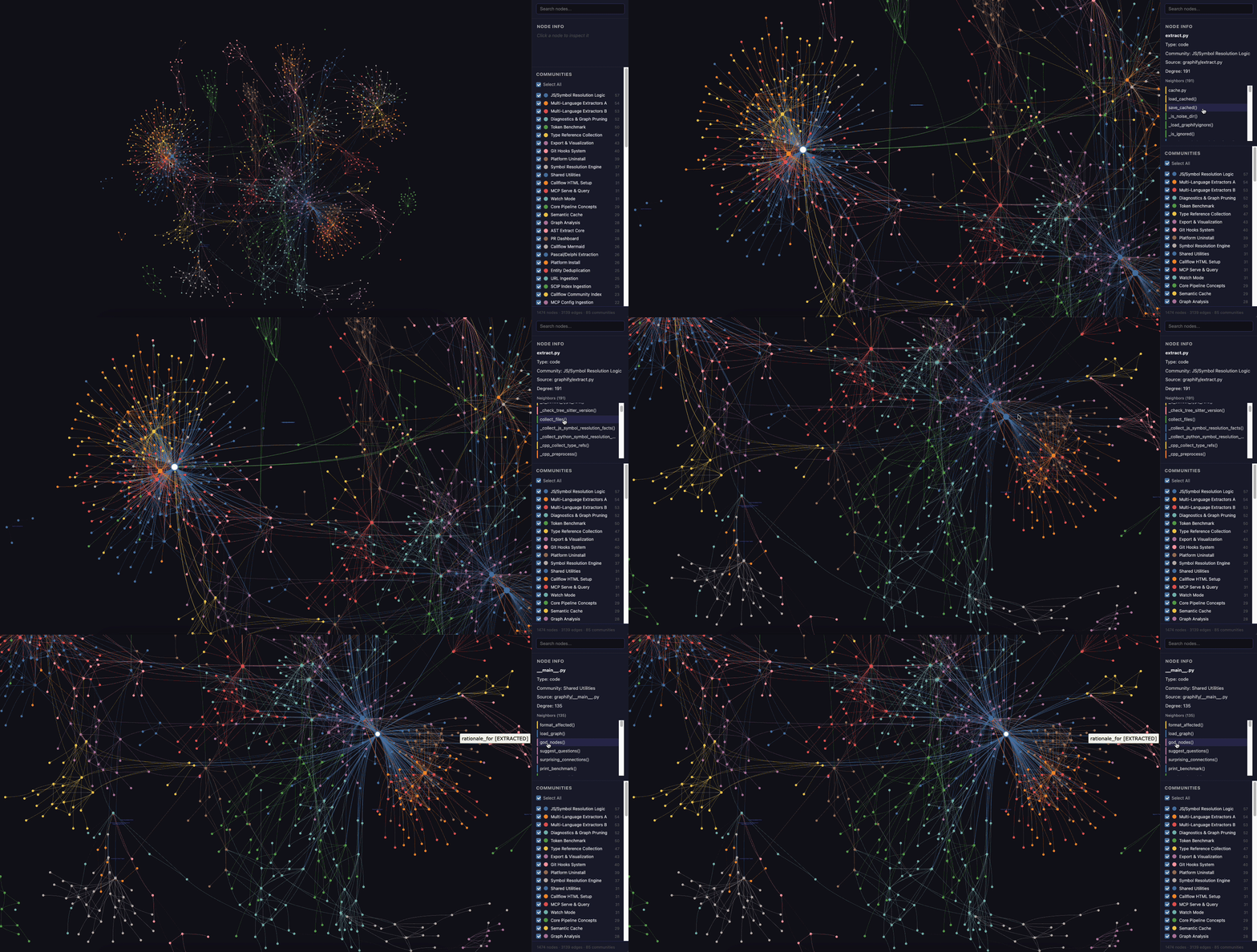
graph.html | Interactive visualization — open in any browser to click nodes, filter by community, and search |
GRAPH_REPORT.md | Human-readable report: god nodes, surprising connections, suggested questions, confidence audit trail |
graph.json | The full knowledge graph in NetworkX node-link JSON format — query it programmatically |
Here's what the interactive HTML visualization looks like — you can click nodes, filter by community, and search:
Querying the Graph#
Once built, you can query the graph without re-reading source files:
# How does extraction connect to graph building?
graphify query "what connects extract to build_graph?"

# Trace data flow across modules:
graphify query "how do files flow from detect to export?" --dfs

# Cap answer length:
graphify query "explain the caching system" --budget 1500

# Shortest path between two concepts:
graphify path "cluster" "report"

# Explain a single node:
graphify explain "community detection"
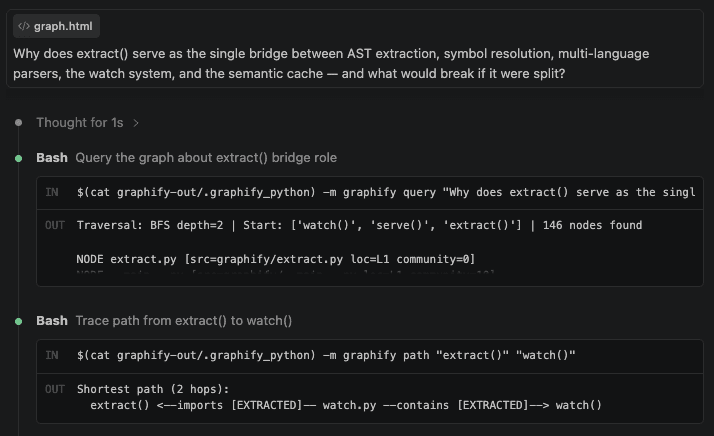
Here's an example of querying the graph in Claude Code — asking why extract() serves as a bridge between multiple subsystems:
And here's the structured result — the graph reveals which communities extract() bridges and how:
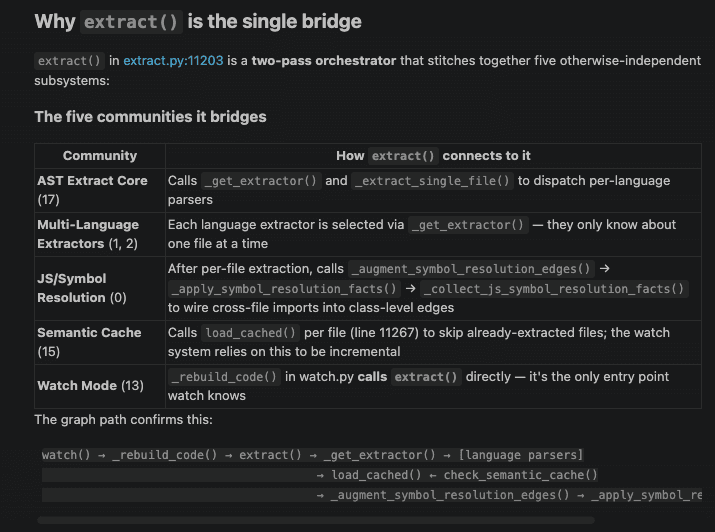
Notice how the answer isn't just "extract calls these functions" — it shows the architectural role: extract() is a two-pass orchestrator that stitches together five otherwise-independent subsystems. This kind of structural insight is what distinguishes a graph query from reading source code line by line.
Incremental Updates#
After modifying files, re-extract only what changed:
/graphify . --update
The SHA256 cache fingerprints every file by content hash. Only new or modified files go through extraction again.
Reclustering Without Re-extraction#
If you want to adjust how modules are grouped into communities without re-extracting all files:
/graphify . --cluster-only
/graphify . --cluster-only --resolution 1.5    # more, smaller communities
/graphify . --cluster-only --exclude-hubs 99   # suppress utility super-hubs from rankings
Adding External Content#
Fetch and integrate external resources into the graph:
# Add a research paper:
/graphify add https://arxiv.org/abs/1810.08473

# Add a video explanation:
/graphify add https://youtube.com/watch?v=...

# Tag authorship:
/graphify add https://arxiv.org/abs/1810.08473 --author "Traag, Waltman, van Eck"
Export Formats#
Graphify can export to multiple formats beyond the default HTML:
graphify export callflow-html    # Mermaid architecture diagrams
/graphify . --obsidian           # Obsidian vault with wiki-links
/graphify . --wiki               # Agent-crawlable markdown wiki
/graphify . --svg                # SVG (embeds in GitHub, Notion)
/graphify . --graphml            # For Gephi/yEd
/graphify . --neo4j              # Neo4j Cypher import
/graphify . --neo4j-push bolt://localhost:7687  # Push directly to Neo4j
/graphify . --no-viz             # Skip HTML, just report + JSON
High-Level Architecture#
Under the hood, Graphify follows a linear pipeline where each stage is a pure function in its own module:
Stage 1: Detection#
detect(root) walks the directory tree and classifies files by type — code, document, PDF, image, or video. It respects .graphifyignore (same syntax as .gitignore) and falls back to .gitignore. It also reports corpus health: total word count, file counts, and warnings for very large or very small corpora.
Stage 2: Extraction#
This is where the heavy lifting happens, running in three passes:
| Pass | File Types | Method | Cost |
|---|---|---|---|
| 1 | Code (.py, .ts, .go, etc.) | Tree-sitter AST parsing | Free (local) |
| 2 | Video/Audio (.mp4, .mp3) | faster-whisper transcription | Free (local) |
| 3 | Docs, PDFs, Images | LLM semantic analysis | Costs tokens |
Pass 1 uses tree-sitter to parse ASTs and extract classes, functions, methods, imports, and call graphs — all locally with zero API calls. It supports 28+ languages. Each language has a dedicated extractor that walks the AST, collects nodes, then runs a second pass that resolves cross-file function calls as INFERRED edges. Language built-in globals (e.g., print, len, String) are filtered to prevent them from becoming spurious god nodes.
Pass 2 transcribes video and audio files locally with faster-whisper. The transcription prompt is seeded with the top god nodes from the code graph to bias toward domain terminology, so technical terms in your videos are transcribed correctly.
Pass 3 dispatches non-code files to LLM subagents in parallel batches. Each subagent reads its batch and outputs the same {nodes, edges} JSON schema as code extraction. Images get their own single-file chunks because vision needs separate context.
Caching: Every file is fingerprinted by SHA256 content hash. A two-layer cache uses stat-based checks (size + mtime) for fast skipping, with full content hashing for correctness when stat attributes change.
Stage 3: Graph Building#
build_from_json() assembles all extraction outputs into a single NetworkX graph. The critical mechanism that makes cross-type linking work is shared node IDs — both the AST extractor and LLM subagents use the same deterministic ID format ({parent_dir}_{filename_stem}_{entity}, normalized via NFKC + casefold).
When a design doc references extract() and the AST already produced a node for that function, both extractors generate the same ID and the nodes merge automatically. This means a document, a piece of code, and an architecture diagram can all reference the same concept and end up connected in the graph without any manual linking.
Deduplication happens in three layers: within a file (AST's seen-IDs set), between files (NetworkX add-node idempotency), and across cache hits and new extractions.
Stage 4: Community Detection#
cluster() runs the Leiden algorithm (preferred, via graspologic) or Louvain (built into NetworkX) as a fallback. The algorithm groups densely-connected nodes into communities based on connectivity — not file type.
This means a design doc that heavily references an authentication module lands in the same community as that module's code. A paper describing an algorithm clusters with its implementation. An architecture diagram's component nodes cluster with the modules they depict.
Stage 5: Analysis and Output#
analyze() identifies god nodes (ranked by degree centrality, filtering out file-level hubs and language builtins) and surprising connections (cross-community edges ranked by unexpectedness — cross-language connections rank higher).
The final stages generate:
GRAPH_REPORT.md— corpus statistics, confidence breakdown, god nodes, surprising connections, community summaries, and suggested questionsgraph.json— the canonical persistent representation in NetworkX node-link formatgraph.html— interactive vis.js visualization with search, filtering, and community coloring
Key Takeaways#
- Graph beats grep for structural questions — When you need to trace how concepts connect across files, a knowledge graph answers in one query what would take dozens of file reads.
- Code extraction is free and local — Tree-sitter AST parsing requires no API key and no internet. You only pay tokens for docs, PDFs, and images.
- Persistence changes the AI workflow — Instead of your assistant re-reading files every session, it queries a pre-built graph. This is cheaper, faster, and produces more structural answers.
- Confidence tags keep you honest — Every relationship is labeled EXTRACTED, INFERRED, or AMBIGUOUS. You always know what's ground truth vs. what the LLM guessed.
- One command to start —
uv tool install graphifyy && graphify install, then/graphify .in your AI assistant.
Check out the project on GitHub: github.com/safishamsi/graphify